Android app · from TidyAudio
ClickWheel Music Player
A classic click-wheel music player app for your Android phone. Spin the wheel to scroll, click to play, and enjoy your own music collection the way it used to feel.
Coming soon to Google Play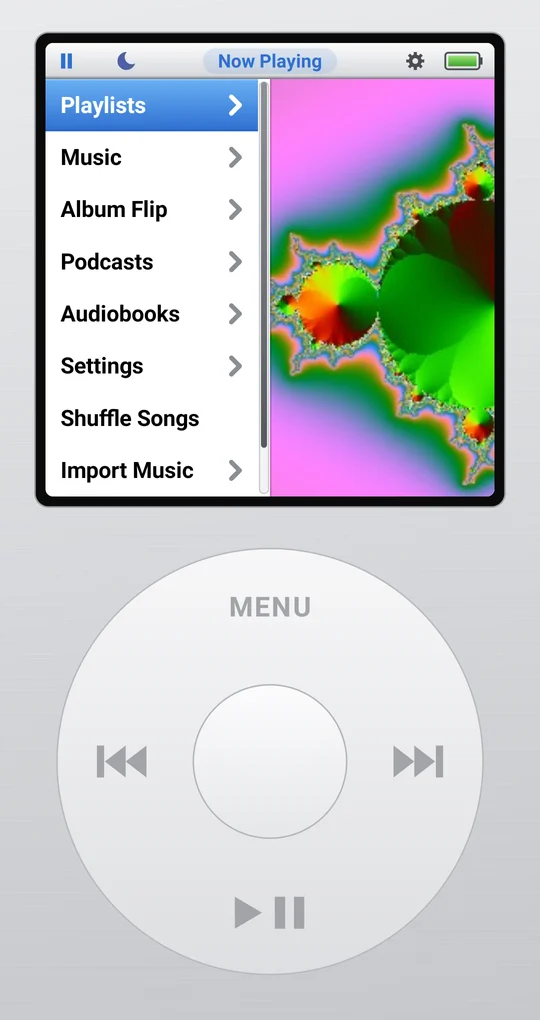
What it does
- A real click wheel: spin to scroll long lists quickly, with a soft click you can hear and feel.
- Your own music from your phone or SD card, by playlist, artist, album, song or genre.
- Album Flip: browse your covers like a record crate, full screen when you turn your phone.
- Podcasts and audiobooks that remember where you stopped, with adjustable speed.
- Playlists, On-The-Go, Top 25 and Recently Added, editable from a computer over Wi-Fi.
- Tidy up: finds duplicates, fills in missing song details and cover art, and organizes your files, with undo.
- Add music from a computer by dragging it onto a page on your Wi-Fi, no cable needed.
- Silver or black player, light or dark screen, EQ presets, sleep timer and voice search.
Google Drive, only what you pick
ClickWheel Music Player can stream music you keep on Google Drive, and download albums for listening offline. Connecting Drive is optional. When you connect, Google's own file picker opens and you choose the music folders or songs ClickWheel may use. ClickWheel can open only what you pick there, never the rest of your Drive, and it uses those files only to show, play and download your music on your phone. Nothing from your Drive is sent to us or anyone else.
You can disconnect at any time in Settings > Google Drive, or remove access from your Google account. Details are in the ClickWheel Privacy Policy.
Privacy
ClickWheel Music Player has no accounts, no ads and no tracking. Your music, playlists and settings stay on your phone. The only times it goes online are to look up missing cover art and song details, and to reach Google Drive if you connect it. Read the full ClickWheel Privacy Policy.
Support
Questions or problems? Email hello@tidyaudio.com. If something went wrong in the app, Settings > About > Last Problem > Share Details sends the details we need to fix it.
Also from TidyAudio
Need to trim, clean up or convert a recording? TidyAudio's free editor does it right in your browser, without uploading anything.